1 minute read
This is Part 1 of a two part series of replacing windows clients with linux in an enterprise environment.
Part 2 is available here
Many businesses use Microsoft Communicator as an Instant Messaging tool, but this can be replicated by a pidgin extension called Pidgin-Sipe.
I am using a Debian system so you can install it as follows.
To install this plugin, you can open a terminal and type
sudo apt-get install pidgin-sipe
Or else open Synaptic and search for sipe, click and install pidgin-sipe.

Once installed, open Pidgin. Click on Accounts=>Manage Accounts and then click on Add.

Select Office Communicator from the list and then enter your credentials.
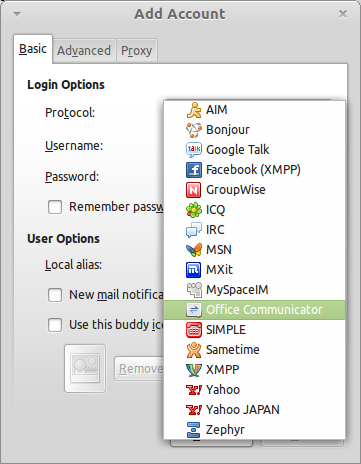
NOTE:
For my system and how I had proxy settings set up, I clicked on the third tab Proxy and set it to no proxy.
Add the account and accept any of the Sipe Server certificates and you should be ready to go.